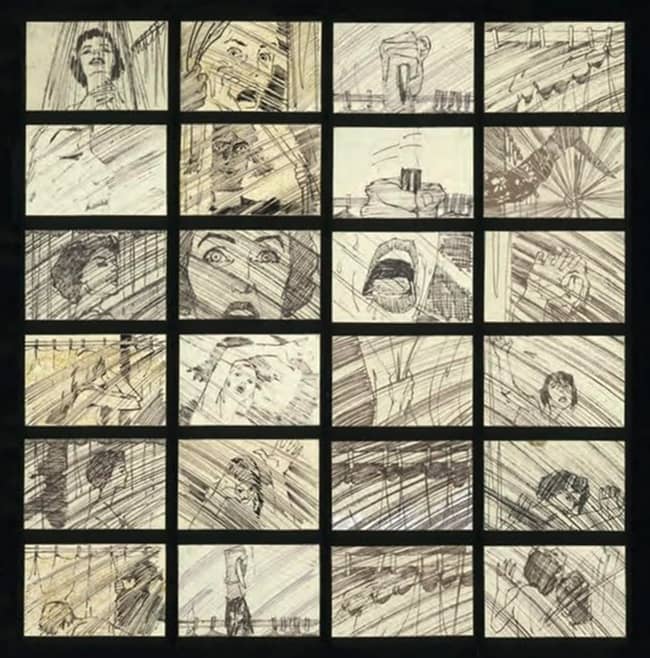
2026
From Script to Screen: Professional Storyboarding Techniques
*Last updated: August 2025 | Reading time: 22 minutes*
Every blockbuster film, viral commercial, and binge-worthy series begins the same way: with a vision that needs to be communicated to dozens, sometimes hundreds, of creative professionals. The bridge between a writer's words and a director's vision isn't built with hope—it's constructed frame by frame through professional storyboarding.
In the high-stakes world of modern production, where a single day of shooting can cost hundreds of thousands of dollars, storyboards aren't just helpful—they're essential. They transform abstract ideas into concrete visual plans, align entire teams around a unified vision, and catch expensive problems before cameras ever roll. Yet despite their critical importance, the art and science of professional storyboarding remains mysteriously opaque to many creators.
This comprehensive guide pulls back the curtain on industry-standard storyboarding techniques used by major studios, streaming platforms, and award-winning independent filmmakers. Whether you're transitioning from amateur to professional work, leading your first major production, or simply wanting to understand how the magic happens, you'll discover the exact processes, tools, and techniques that transform scripts into screen-ready visual blueprints.
From understanding the subtle differences between director's boards and presentation boards to mastering the visual shorthand that communicates complex camera movements in a single frame, this guide provides the professional foundation that separates hobbyist sketches from production-ready storyboards.
### Table of Contents
1. **The Professional Storyboarding Ecosystem**
- Who uses storyboards and why
- The storyboard artist's role in production
- Different types of boards for different purposes
- When storyboards become legal documents
2. **Anatomy of a Professional Storyboard**
- Industry-standard formats and specifications
- Essential information for every frame
- Technical annotations that save time and money
- The language of arrows, lines, and symbols
3. **Script Analysis and Breakdown**
- Identifying storyboard-critical moments
- Translating written action into visual beats
- Finding the visual spine of a scene
- Working with incomplete or changing scripts
4. **Camera Language and Movement**
- The 25 essential shots every storyboard artist must know
- Communicating camera movement in static frames
- Matching shots to emotional intent
- Virtual camera techniques for CGI and VFX scenes
5. **The Director-Storyboard Artist Relationship**
- First meeting preparation and questions
- Translating director's vision into frames
- When to suggest alternatives
- Handling creative differences professionally
6. **Production Storyboarding Workflows**
- Timeline management for TV vs. film vs. commercial
- Rush job strategies without sacrificing quality
- Revision tracking and version control
- Digital handoff and distribution methods
7. **Specialized Storyboarding Techniques**
- Action sequences and fight choreography
- VFX-heavy scenes and previz integration
- Comedy timing and visual gags
- Emotional scenes and subtle performance notes
8. **Technical Requirements and Specifications**
- Resolution and format standards
- Color vs. black and white decisions
- Aspect ratio considerations
- File naming conventions and organization
9. **Collaboration Across Departments**
- Working with cinematographers
- Coordinating with production designers
- VFX supervisor requirements
- Stunt coordinator integration
10. **Building Your Professional Portfolio**
- Samples that get you hired
- NDA-friendly presentation strategies
- Rate negotiation and contracts
- Moving from freelance to studio positions
11. **Tools of the Trade**
- Professional software comparison
- Hardware for speed and efficiency
- Cloud collaboration platforms
- AI integration without losing the human touch
12. **Case Studies: From Script to Screen**
- Marvel action sequence breakdown
- Pixar's storyboard-to-animation pipeline
- Commercial production: 30 seconds, 100 boards
- Independent film: Maximum impact, minimum budget
1. The Professional Storyboarding Ecosystem
Who Uses Storyboards and Why
Storyboards are used across nearly every visual storytelling discipline: film, television, animation, commercials, video games, and even live events. While directors are the most visible users, storyboards influence decisions made by cinematographers, production designers, stunt coordinators, editors, VFX supervisors, and producers.
Their primary purpose is communication. When dozens of departments must align on timing, framing, camera movement, and blocking, storyboards function as a universal visual language.
Studios rely on them to:
- Plan camera setups and shot coverage
- Estimate production time and budget
- Coordinate stunts, VFX, and practical effects
Align creative departments before filming begins
In large productions, storyboards often determine how a scene will be shot months before the camera arrives on set.
The Storyboard Artist’s Role in Production
A professional storyboard artist sits at the intersection of storytelling and technical planning. They interpret scripts and translate them into visual sequences that anticipate camera placement, performance, editing rhythm, and spatial geography.
Their responsibilities may include:
- Visualizing scenes from the script
- Exploring shot compositions
- Planning action beats and pacing
- Communicating camera moves
- Iterating with directors and producers
In animation studios, storyboard artists may even shape the narrative itself—entire scenes are often rewritten during the storyboarding phase.
Different Types of Boards for Different Purposes
Not all storyboards serve the same function.
Common types include:
Concept Boards
Loose sketches exploring visual possibilities.
Director’s Boards
Detailed sequences defining shot design and narrative flow.
Presentation Boards
Highly polished visuals used for pitching projects to executives or clients.
Technical Boards
Precise drawings that communicate stunt choreography, VFX layers, or complex camera moves.
Each serves a different audience, from creative teams to studio executives.
When Storyboards Become Legal Documents
In commercial advertising and large productions, storyboards can become contractual artifacts. Clients often approve boards before production begins, and those approvals can define what must appear in the final deliverable.
If a scene deviates from the approved storyboard, additional approval—or budget—may be required. For that reason, storyboard clarity and precision carry real legal and financial consequences.
2. Anatomy of a Professional Storyboard
Industry-Standard Formats and Specifications
Professional storyboards follow standardized layouts that allow quick interpretation by production teams.
A typical frame contains:
- Image panel
- Shot number
- Scene number
- Dialogue or action description
- Camera direction notes
- Timing information
Panels are arranged sequentially, usually in rows of three or four per page.
Essential Information for Every Frame
Each frame should communicate:
- Who is in the shot
- What action occurs
- Where the camera is positioned
- How the shot connects to the previous one
If a viewer cannot understand the shot in three seconds, the board needs refinement.
Clarity is more important than artistic detail.
Technical Annotations That Save Time and Money
Professional boards often include shorthand notes such as:
- CU — close-up
- WS — wide shot
- PAN L/R — camera pan direction
- DOLLY IN/OUT — camera movement forward/back
Additional notes may specify:
- lens choices
- lighting direction
- actor blocking
- visual effects layers
These annotations allow departments to begin planning immediately.
The Language of Arrows, Lines, and Symbols
Visual shorthand is critical.
Common symbols include:
- Arrows for camera movement
- Dashed outlines for character motion
- Framing boxes to indicate zoom
- Ghosted figures to show movement progression
A well-designed storyboard communicates motion and timing within a static image.
3. Script Analysis and Breakdown
Identifying Storyboard-Critical Moments
Not every line of dialogue needs a storyboard.
Artists focus on scenes that involve:
- action or stunts
- complicated blocking
- VFX integration
- emotional turning points
- complex camera movement
Dialogue scenes may require only minimal planning.
Translating Written Action Into Visual Beats
Scripts describe events sequentially, but visuals must express those events spatially and emotionally.
Storyboard artists break action into beats:
- Character enters frame
- Camera tracks movement
- Reaction shot
- Object interaction
Each beat becomes one or more frames.
Finding the Visual Spine of a Scene
Every scene has a visual intention: tension, surprise, intimacy, spectacle.
The storyboard must reinforce that intention through:
- shot scale
- camera distance
- pacing
- transitions
This “visual spine” keeps the sequence cohesive.
Working With Incomplete or Changing Scripts
Film productions often evolve during development.
Storyboard artists must remain flexible:
- building modular sequences
- adjusting shot structure quickly
- updating boards during revisions
Speed and adaptability are as important as artistic skill.
4. Camera Language and Movement
The 25 Essential Shots Every Storyboard Artist Must Know
Professional boards rely on established cinematic vocabulary:
- Extreme wide shot
- Wide shot
- Medium shot
- Close-up
- Extreme close-up
- Over-the-shoulder
- Point-of-view shot
- Dutch angle
- Insert shot
- Tracking shot
- Crane shot
Mastery of these shots allows artists to communicate ideas instantly.
Communicating Camera Movement in Static Frames
Movement is indicated through:
- directional arrows
- multiple panels showing progression
- framing guides
- motion blur sketches
Complex moves may require two or three frames to illustrate properly.
Matching Shots to Emotional Intent
Shot design is emotional design.
Examples:
- Wide shots create isolation or scale
- Close-ups emphasize vulnerability
- Low angles convey power
- Handheld-style framing suggests chaos
Storyboard choices directly shape audience perception.
Virtual Camera Techniques for CGI and VFX Scenes
In CGI-heavy productions, storyboard artists often collaborate with previs teams who build 3D versions of the boards.
These virtual cameras allow directors to test:
- camera paths
- stunt choreography
- digital environment scale
The storyboard becomes the blueprint for digital previsualization.
5. The Director–Storyboard Artist Relationship
First Meeting Preparation and Questions
The initial meeting sets the creative tone.
Artists typically ask:
- What emotional tone should the scene convey?
- Are there visual references or films you admire?
- Are there budget or technical constraints?
- Which shots are essential versus flexible?
Understanding priorities prevents wasted work.
Translating the Director’s Vision Into Frames
Directors often describe scenes abstractly.
Storyboard artists convert those descriptions into concrete choices about framing, staging, and camera placement.
Interpretation is part of the craft.
When to Suggest Alternatives
Experienced artists propose options when:
- pacing could improve
- clarity could increase
- production constraints exist
Good collaboration balances respect with creative insight.
Handling Creative Differences Professionally
Disagreements happen frequently.
The best approach:
- Present alternate frames
- Explain narrative or logistical reasoning
- Let the director make the final call
Professional diplomacy keeps production moving smoothly.
6. Production Storyboarding Workflows
Timeline Management for TV vs Film vs Commercial
Production schedules vary dramatically.
Feature films: months of storyboarding
TV episodes: weeks or days
Commercials: sometimes hours
Artists must scale their process accordingly.
Rush Job Strategies Without Sacrificing Quality
When deadlines compress:
- focus on critical shots first
- simplify character drawings
- prioritize camera clarity
Speed comes from disciplined shorthand, not cutting corners.
Revision Tracking and Version Control
Modern productions track storyboard versions carefully.
Each revision includes:
- updated timestamps
- version numbers
- change summaries
This prevents confusion when multiple departments reference the boards.
Digital Handoff and Distribution Methods
Storyboards are shared through:
- production databases
- cloud storage
- project management systems
Departments access the latest versions instantly.
7. Specialized Storyboarding Techniques
Action Sequences and Fight Choreography
Action boards must clearly show:
- spatial relationships
- stunt timing
- safety considerations
Artists often collaborate directly with stunt coordinators.
VFX-Heavy Scenes and Previz Integration
VFX boards may include layered diagrams showing:
- green screen areas
- digital elements
- camera tracking markers
These frames guide both on-set shooting and post-production.
Comedy Timing and Visual Gags
Comedy relies on rhythm.
Storyboards control:
- reveal timing
- reaction shots
- visual setups and payoffs
Small timing changes can dramatically affect humor.
Emotional Scenes and Subtle Performance Notes
Quiet scenes still require planning.
Boards may include notes such as:
- lingering close-up
- slow push-in camera movement
- reaction emphasis
These details guide performance and editing.
8. Technical Requirements and Specifications
Resolution and Format Standards
Most modern boards are delivered digitally.
Common formats:
- PDF for distribution
- PSD for editable files
- PNG or JPG for individual frames
Resolution must remain clear when printed or zoomed.
Color vs Black-and-White Decisions
Many boards remain grayscale because speed matters.
Color is used when:
- lighting is important
- wardrobe contrasts matter
- client presentations require polish
Otherwise, simple tonal shading is sufficient.
Aspect Ratio Considerations
The storyboard frame should match the project’s aspect ratio:
- 2.39:1 for cinematic widescreen
- 16:9 for television
- vertical formats for mobile content
Incorrect framing can cause production mistakes.
File Naming Conventions and Organization
Professional naming systems may look like:
SC03_SH12_v04_SB_artistname.psd
Consistent naming prevents version confusion across large teams.
9. Collaboration Across Departments
Working With Cinematographers
Cinematographers use storyboards to plan:
- lens choices
- lighting direction
- camera rigs
Early collaboration ensures feasibility.
Coordinating With Production Designers
Production designers reference boards to plan:
- set construction
- prop placement
- background composition
A good storyboard anticipates environmental storytelling.
VFX Supervisor Requirements
VFX teams require boards showing:
- plate shots
- digital inserts
- tracking elements
These details prevent costly reshoots.
Stunt Coordinator Integration
Stunts demand precision.
Storyboard frames outline:
- safety zones
- actor vs stunt double positions
- rigging placements
Clear communication keeps everyone safe.
10. Building Your Professional Portfolio
Samples That Get You Hired
Strong portfolios include:
- action sequences
- dialogue scenes
- comedic timing
- complex camera moves
Variety demonstrates versatility.
NDA-Friendly Presentation Strategies
Many artists cannot show completed film sequences due to nondisclosure agreements.
Instead they present:
- recreated frames
- personal projects
- anonymized work samples
This protects confidentiality.
Rate Negotiation and Contracts
Rates vary widely by region and production scale.
Artists negotiate based on:
- project duration
- complexity
- union agreements
Professional contracts clarify expectations.
Moving From Freelance to Studio Positions
Many artists begin as freelancers.
Studio roles often require:
- strong collaborative skills
- production pipeline familiarity
- consistent delivery under deadlines
Networking within productions is often the path to long-term positions.
11. Tools of the Trade
Professional Software Comparison
Popular tools include:
- Toon Boom Storyboard Pro
- Adobe Photoshop
- Clip Studio Paint
- Procreate
Each balances drawing flexibility with production pipeline integration.
Hardware for Speed and Efficiency
Most artists use:
- pen display tablets
- large monitors
- high-performance computers
Fast hardware dramatically increases productivity.
Cloud Collaboration Platforms
Modern productions rely on:
- shared storage systems
- project management tools
- review platforms
Teams across multiple locations can review boards instantly.
AI Integration Without Losing the Human Touch
AI tools are increasingly used for:
- reference generation
- rough composition ideas
- background exploration
However, human interpretation remains essential for storytelling nuance.
12. Case Studies: From Script to Screen
Marvel Action Sequence Breakdown
Large-scale action films often storyboard entire set pieces months before filming.
Boards define:
- explosion timing
- stunt choreography
- digital character placement
These sequences may contain hundreds of panels.
Pixar’s Storyboard-to-Animation Pipeline
Animation studios treat storyboards as an early version of the film itself.
Artists create “story reels” where panels are edited together with temporary dialogue and music.
Entire scenes are rewritten at this stage before expensive animation begins.
Commercial Production: 30 Seconds, 100 Boards
Advertising demands extreme precision.
A 30-second commercial may require 80–100 storyboard panels to capture exact timing and brand messaging.
Clients approve every frame before production begins.
Independent Film: Maximum Impact, Minimum Budget
Independent filmmakers use storyboards strategically to maximize limited resources.
By planning shots carefully, small crews can shoot efficiently while still achieving cinematic results.
For indie productions, strong storyboards often mean the difference between a chaotic shoot and a polished final film.
Recap
Storyboarding sits at the heart of visual storytelling. It is both an artistic discipline and a logistical tool—one that transforms imagination into executable plans.
When done well, storyboards align creative vision with production reality, prevent costly mistakes, and empower entire teams to build something larger than any one individual could imagine.
Whether you're sketching your first scene or leading a major production, mastering professional storyboarding techniques is one of the most powerful skills a visual storyteller can develop.